AI receipt scanning

The receipt scanner app that turns receipts into a budget

Snap your receipt and let artificial intelligence do the work: Budgetto reads every line, recognizes items and prices, assigns categories and updates your household budget. Zero typing.

Download on the App Store Coming soon to Google Play

Free on iPhone · No credit card needed

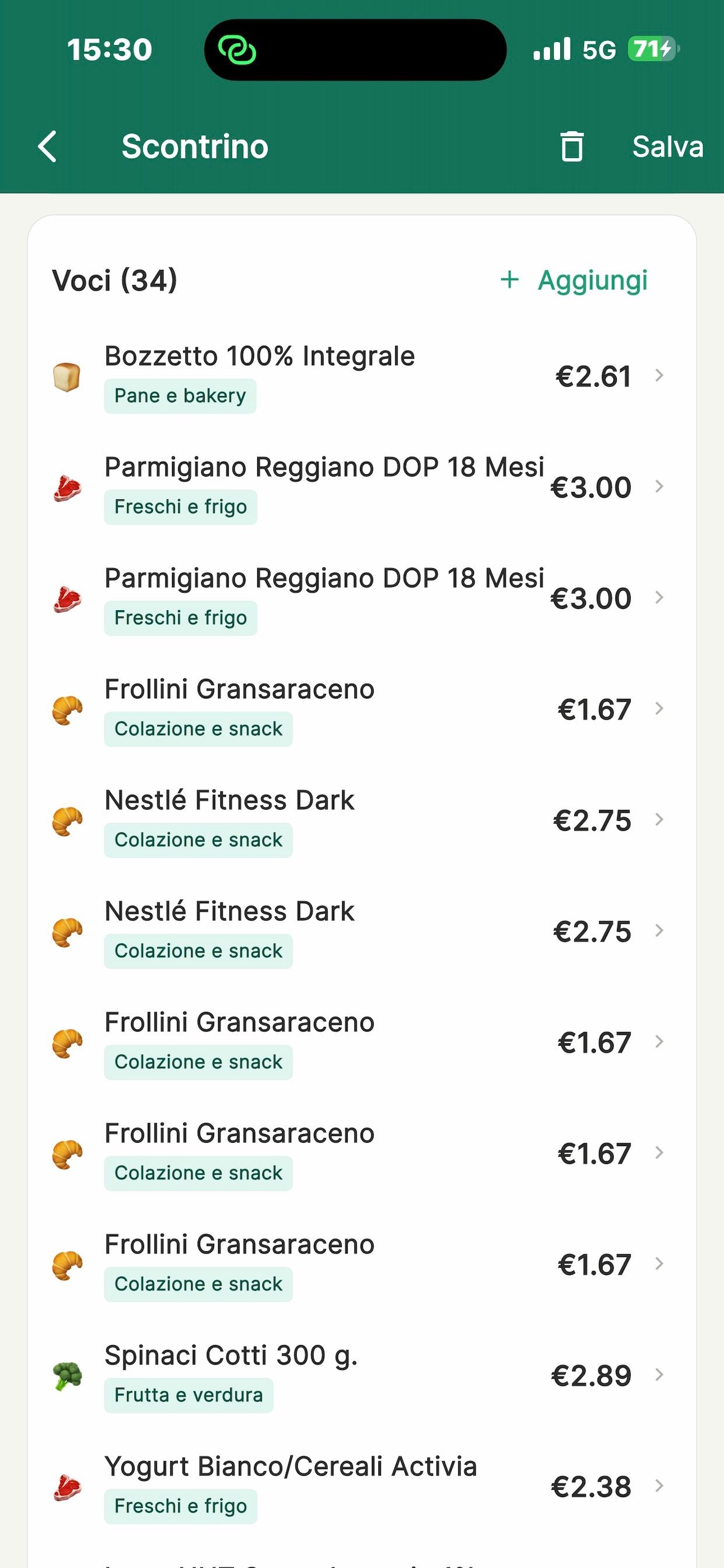
Receipt read by Budgetto’s AI with products, prices and categories

Why scan receipts with Budgetto

  • Every item, not just the total

    Many apps only record the amount. Budgetto extracts every single item with its price, so you know exactly how much goes on meat, fruit or household supplies.

  • Abbreviations decoded

    Receipts are full of cryptic codes. The AI expands them into clear product names you can actually understand.

  • Long receipts? No problem

    Take several photos of the same receipt: Budgetto merges and reads them as a single document, even with 30+ items.

  • Total check

    Budgetto compares the sum of the lines with the printed total and flags any difference so you can fix it in one tap.

How to scan a receipt

  1. 1

    Tap the scan button

    Shoot with the camera, even in several photos, or choose images from your gallery.

  2. 2

    Wait a few seconds

    The AI reads the receipt, extracts store, date, items and prices and assigns categories.

  3. 3

    Review and save

    Edit a line if needed and save: the expense instantly lands in the whole family’s budget.

A receipt app made for everyday grocery shopping

Tracking grocery spending is the most effective way to save, but copying receipts into a spreadsheet takes time and discipline. Budgetto removes that step: a photo of the receipt becomes a tidy list of items, prices and categories in seconds.

The 20 categories are designed around real family life: fruit and veg, meat and fish, dairy, frozen food, drinks, personal care, kids, pets, pharmacy, dining out and more. Discounts are recognized and subtracted correctly.

The free plan includes 5 scans per month; for expenses without a receipt you can use quick expense, which doesn’t use any scans. With Premium, scans are unlimited for the whole family.

FAQ

Frequently asked questions

How accurate is receipt reading?

The AI reads items, prices and discounts with high accuracy, even on long or poorly printed receipts. Budgetto also checks that the lines add up to the total and lets you correct any row.

Can I scan receipts from places other than supermarkets?

Yes: pharmacies, restaurants, clothing stores, hardware stores and any other shop. Categories are assigned based on the items.

Can I upload a photo I already took?

Yes, you can pick one or more images from your phone’s gallery.

How many scans do I get on the free plan?

The Free plan includes 5 AI scans per month per family. With Premium (from €2.99/month) they’re unlimited.

Scan your first receipt

Download Budgetto for free and try AI reading on your next grocery receipt.

Download on the App Store Coming soon to Google Play

Free on iPhone · No credit card needed